

Simplify Kubernetes Secret Management with External Secrets Operator

I am a Kubernetes Engineer passionate about leveraging Cloud Native ecosystem to run secure, efficient and effective workloads.
Intro
Managing secrets in Kubernetes is tricky as the "Secrets" are not really Secrets but just encoded configMaps. You cannot store Secrets definitions in Helm on source code or you cannot rotate these secrets. So there must be a better way of managing secrets. You might already have secrets somewhere else like Vault or AWS SecretsManager that you want to access in the cluster. One way of addressing this issue is by using External Secrets Operator(ESO)
ESO Architecture
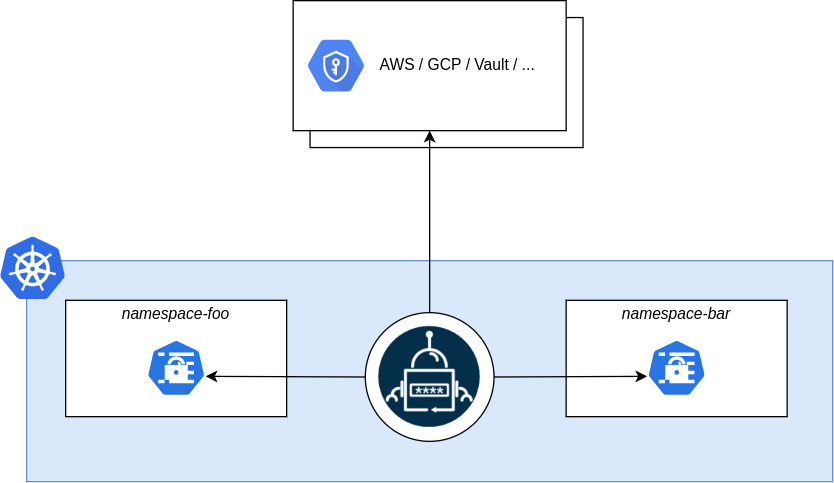
ESO extends Kubernetes functionality using Custom Resources. Firstly you can install ESO in cluster using Helm
helm repo add external-secrets https://charts.external-secrets.io

helm install external-secrets \
   external-secrets/external-secrets \
    -n external-secrets \
    --create-namespace \
This installs bunch of CRDs from ESO
➜  ESOperator k get crds |grep external-secrets
acraccesstokens.generators.external-secrets.io          2024-05-20T16:34:03Z
clusterexternalsecrets.external-secrets.io              2024-05-20T16:34:03Z
clustersecretstores.external-secrets.io                 2024-05-20T16:34:03Z
ecrauthorizationtokens.generators.external-secrets.io   2024-05-20T16:34:03Z
externalsecrets.external-secrets.io                     2024-05-20T16:34:03Z
fakes.generators.external-secrets.io                    2024-05-20T16:34:03Z
gcraccesstokens.generators.external-secrets.io          2024-05-20T16:34:03Z
githubaccesstokens.generators.external-secrets.io       2024-05-20T16:34:03Z
passwords.generators.external-secrets.io                2024-05-20T16:34:03Z
pushsecrets.external-secrets.io                         2024-05-20T16:34:03Z
secretstores.external-secrets.io                        2024-05-20T16:34:03Z
vaultdynamicsecrets.generators.external-secrets.io      2024-05-20T16:34:03Z
webhooks.generators.external-secrets.io                 2024-05-20T16:34:03Z
Of these the important ones to understand the architecture are
SecretStore secretstores.external-secrets.io
SecretStore is like a centralized location where all your secrets are located like Vault, AWS Secrets Manager, Azure Key Vault etc. All the providers are listed in their documentation. You can configure it using the resource definition file. For AWS SM I have created new user and gave it permissions for the SM and configured the SecretStore with the below definition file
apiVersion: external-secrets.io/v1beta1
kind: SecretStore
metadata:
  name: secretstore-sample
spec:
  provider:
    aws:
      service: SecretsManager
      region: us-east-2
      auth:
        secretRef:
          accessKeyIDSecretRef:
            name: awssm-secret
            key: access-key
          secretAccessKeySecretRef:
            name: awssm-secret
            key: secret-access-key
Once you configure it, you have to make sure it is Ready
➜  ESOperator k get secretstores.external-secrets.io
NAME                 AGE     STATUS   CAPABILITIES   READY
secretstore-sample   3h42m   Valid    ReadWrite      True
Now I can access all the secrets from SM in the cluster. To get one secret, you need to write definition for externalSecret
ExternalSecret externalsecrets.external-secrets.io
As the name suggests, the external secret is a secret from external source. It depends on the secretstore to provide the secret. I have used below definition file to fetch secret from the AWSSM named DB_CREDENTIALS
apiVersion: external-secrets.io/v1beta1
kind: ExternalSecret
metadata:
  name: example
spec:
  refreshInterval: 10m
  secretStoreRef:
    name: secretstore-sample
    kind: SecretStore
  target:
    name: kube-secret
    creationPolicy: Owner
  dataFrom:
  - extract:
      key: DB_CREDENTIALS
Here target.name is the name of secret that you want to be created. As you can see that the secret is created here.
NAME           TYPE     DATA   AGE
awssm-secret   Opaque   2      4h32m
kube-secret    Opaque   2      3h52m
The thing is the secret is not encrypted. You have to do etcd encryption at rest to protect all the data. Using these two can make your cluster secure and robust.
Conclusion
I can see that ESO is extensible and can be used in various scenarios. This is a compelling alternative to vault sidecar injection. Especially when you take cost into consideration.


